Smart text recovery
For the unruly archive, on your own machine.
Historical archives do not arrive as tidy, uniform PDFs. A real collection is a chaotic mix of linen postcards, dense multi-column trade journals, illustrated theatre handbills and hand-lettered vaudeville posters. One-size-fits-all OCR fails on this material because it assumes clean, high-contrast, linearly structured print.
Tetrak OCR is a small, local-first tool that turns those scans into full-text transcripts — text you can attach to the images in your catalogue or digital asset management system, so that collections become searchable by their contents, hard-to-read items gain a readable transcript, and screen readers have a text alternative to work with. It inspects each document, runs the viable local engines over it, scores their output without a reference transcript, and sets aside anything too poor to trust.
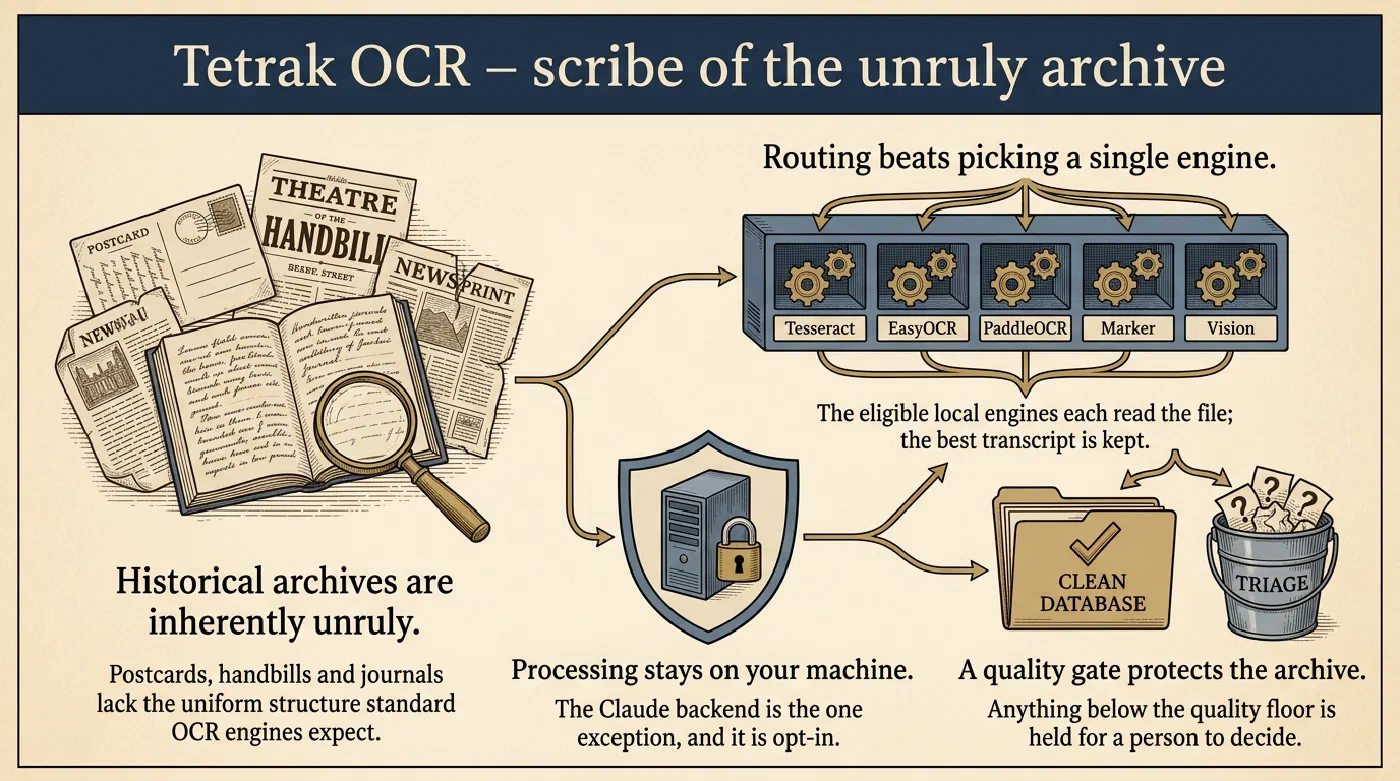
auto-local fans out over the engines eligible for that file — four at most, two for a PDF. Vision is macOS-only and is not currently in that pool, though it measures as the strongest local engine on the corpus.One interface, multiple engines
Tesseract, EasyOCR, PaddleOCR, Marker, Apple Vision and Claude behind a single call. Swap engines with a flag; nothing else in your pipeline changes.
auto-localpicks for youRuns every viable local engine on each file, scores the results with no reference text, and keeps the best one. Per file, not per batch. Name a single engine instead when throughput matters more.
Everything stays on your machine
No cloud account, no API key, no material leaving the building. The one cloud path — a vision-model escalation for pages nothing local can read — is opt-in, per file, invoked by a person.
It tells you when it failed
Anything below the quality floor goes to a
workspace/triage/queue with a manifest of what each engine produced. Bad transcripts do not enter your archive looking like good ones.
Two problems, one tool
No single OCR engine wins on mixed material. Measured over a corpus of Los Angeles stage and picture-palace ephemera (c. 1910–1945), five different engines win across nine documents. There is no setting you can choose once and be right:
| Your archival material | Best local engine | Character similarity | Word recall |
|---|---|---|---|
| Printed captions and postcard reverses | tesseract-auto | 0.91 | 0.71 |
| Low-contrast, textured illustration fronts | easyocr | 0.87 | 0.71 |
| Illustrated newspaper advertising | marker | 0.75 | 0.88 |
| Multi-page souvenir programmes | marker | 0.66 | 0.93 |
| Dense small type on a playbill | paddle | 0.39 | 0.90 |
| Hand-lettered display type | paddle | 0.13 | 0.39 |
| Mixed collections, unattended | auto-local | 0.57 | 0.76 |
Choosing per file rather than per batch is worth a real margin: auto-local
beats any single local engine on both metrics, entirely offline and free.
The research walks through how that was measured, and
the detail has the full benchmark, the method and its
honest caveats.
Some material cannot go to a cloud service. Donated collections often arrive with promises attached — donor agreements, privacy constraints, material about living people — and many institutions simply do not want collection scans leaving the building, least of all into services that might train on them. Tetrak OCR’s answer is structural rather than contractual: processing happens on your machine, nothing requires an account or a key, and the one path that sends a file to an API exists only as a deliberate, per-file decision by a person looking at the triage queue.
Who it is for
Curators of special collections, regional and county archives, local history societies, community archives, and museum collections rich in ephemera — the institutions with the most unruly material and the least appetite for cloud contracts. It runs on ordinary hardware; the reference environment is a laptop. If your aim is publishing out-of-copyright material openly, the full pipeline applies too, escalation included; if your collections carry restrictions, everything useful happens without any material leaving your machine.
Get it
pip install "tetrak[all]"
tetrak-ocr batch --backend auto-local
The tutorial is the three-minute version; the user guide covers installation, the optional extras, the command line and the Python API in full.
Where to go next
Install it, transcribe one image and batch a small folder, in three steps.
Installation and the optional extras, every command and flag, the Python API, and tutorials that go further.
Nine documents, five engines and what each one breaks, in five beats — then the corpus, the method, the full benchmark, which tool to reach for, and how each finding became a mechanism, including what the numbers do not establish, and one retracted finding.
The corpus, the engines as measured, routing and licensing, and where the user guide documents the command line and the Python API.